
WPS Divi Website Rescue
Your Divi Builder won’t load. The layout shifted after an update. Pages are dragging, or something that worked last month suddenly doesn’t. Whatever’s gone wrong, there’s a real fix — and it starts with someone who knows Divi inside and out. Since 2015, WPSimplifyd has been building websites with Divi exclusively (including this one) — and knows where to look when something breaks. Let’s find out what’s really going on with your website.

First, Let’s Clear Something Up About Divi
If you’ve spent any time in WordPress forums or Facebook groups, you’ve seen the complaints: Divi is slow, Divi is bloated, Divi sites all look alike, Divi breaks. It’s the easiest thing in the world to blame Divi when a site misbehaves — and doing so is almost always wrong. The truth is, Divi streamlines the work that matters. Clients can update their own content without calling a developer for every small change.
And an experienced specialist like WPSimplifyd can extend your Divi website with custom code wherever needed, or improve a site’s design without rebuilding it from scratch.
Divi 5 — a complete rewrite that eliminates the old shortcode system — also addresses the performance and code-weight criticisms head-on. So before we look at what's actually going wrong with your website, let's be clear: Divi is rarely the problem.
Is Your Divi Site Doing One of These?
If Divi usually isn’t the problem, then what is? These are some of the most common situations that bring people here — but they’re just examples. Whatever your Divi site is doing, you don’t need to pinpoint the cause yourself — figuring out what’s actually wrong is exactly where WPSimplifyd comes in.
Builder & Editing
- Builder won’t load — you hit “Enable Visual Builder” and it spins, stalls, or never opens
- Saving fails — the Builder freezes or times out, or your changes won’t stick
- Broken editing view — parts of a page show up blank or jumbled while you work
- Sluggish Builder — editing has slowed to a crawl on your bigger pages
Speed
- Slow pages — your site takes too long to load on desktop, phone, or both
- Sudden slowdown — it felt fine before, and now it drags
- Worse on mobile — it’s especially sluggish on phones
- Hurting your rankings — you’ve been told site speed is dragging down your SEO
Mobile & Menus
- Mobile menu broken — it won’t open, won’t close, or won’t drop down
- Falls apart on phones — looks right on your computer, wrong on mobile
- Breakpoint issues — text or spacing looks off only at certain screen sizes
Forms & Content
- Form submissions vanish — the form submits, but messages never reach you
- Form won’t send — submissions fail outright
- Broken elements — a popup, slider, or section that used to work has stopped
- Missing content — a section that used to have content is now blank
Divi 5
- Broke after updating — your site looks wrong since moving to Divi 5
- Lost customizations — custom styling or layouts didn’t survive the migration
- Stuck mid-migration — a plugin or module isn’t Divi 5-ready yet
- Unsure about updating — you don’t know whether to move to Divi 5, or what it’ll do
- Something’s off — it looked wrong the moment after the update
Not Sure What’s Wrong?
- Looks different to visitors — your site appears one way to you, another to them
- Can’t tell what it is — broken, neglected, or actually hacked?
If something’s wrong and you don't see it above, that’s not a problem; it just means the assessment has something to figure out. The next section breaks down what's actually behind the most common issues.

Common Divi Problems & What’s Really Causing Them
When something breaks on a Divi site, the visible issue is rarely the whole story. A Builder that won’t load, a slow page, or a form that’s gone quiet are usually symptoms — not root causes. Understanding why these problems happen is what separates a temporary patch from a fix that holds.
Crisis Fixes vs. Ongoing Divi Care
| DIY Crisis Mode | WPS Website Care Plan |
|---|---|
| Pay per emergency, unpredictable costs | Predictable monthly investment |
| Problems found after something breaks | Monitoring catches issues earlier |
| Updates run straight on the live site | Changes tested before they go live |
| Rushed, guess-and-check troubleshooting | Methodical diagnostics and documentation |
| Hope the fix holds | Ongoing attention to stability and speed |
Rescue restores your site now. A care plan is what keeps it from ending up here again — and it’s more than updates and monitoring: it includes ongoing hands-on time with the same specialist for the small fixes and improvements that would otherwise pile up into the next emergency. It’s the natural next step once the fire’s out.
The Part Most “Rescue” Services Won’t Tell You
Here’s an honest conversation up front, before you spend a dime.
Most Divi problems aren’t a single broken thing floating in isolation. They’re a symptom sitting on top of a shaky foundation — and you can’t responsibly fix the symptom until the foundation can support the work.
Before any real troubleshooting begins, three things usually need to be in place: 1) hosting that meets (or ideally exceeds) Divi’s requirements, 2) a staging environment for testing, and 3) reliable one-click backups. Without them, troubleshooting means working on your live site with no safety net — and that’s how a small problem becomes a disaster.
This isn’t upselling. It’s the difference between someone who’ll poke at your live site and hope, and someone who works the way it’s supposed to be done. And often, the surprising part is that addressing the foundation resolves the original problem on its own — a migration to proper hosting, a clean easy-to-deploy staging copy, and an honest look at what’s installed frequently make the “bug” disappear.
Where WPSimplifyd Looks First
A genuine Divi diagnosis starts in a specific place — not guesswork:
- Divi → Support Center → System Status.
This single screen reveals whether the hosting environment can even run Divi properly — and it’s the first place WPSimplifyd looks. Divi checks each setting against its own recommendation and flags it green or red, so you don’t need to memorize any numbers — you’re looking for red dots. The ones that most often explain a Builder that won’t load, saves that fail, or imports that time out are the PHP resource settings:
- memory_limit
- post_max_size
- upload_max_filesize
- max_execution_time and
- the PHP version itself.
When any of those show red, the fix usually isn’t Divi at all — it’s the hosting environment, which is exactly why a migration or a server-config change so often resolves the original complaint.
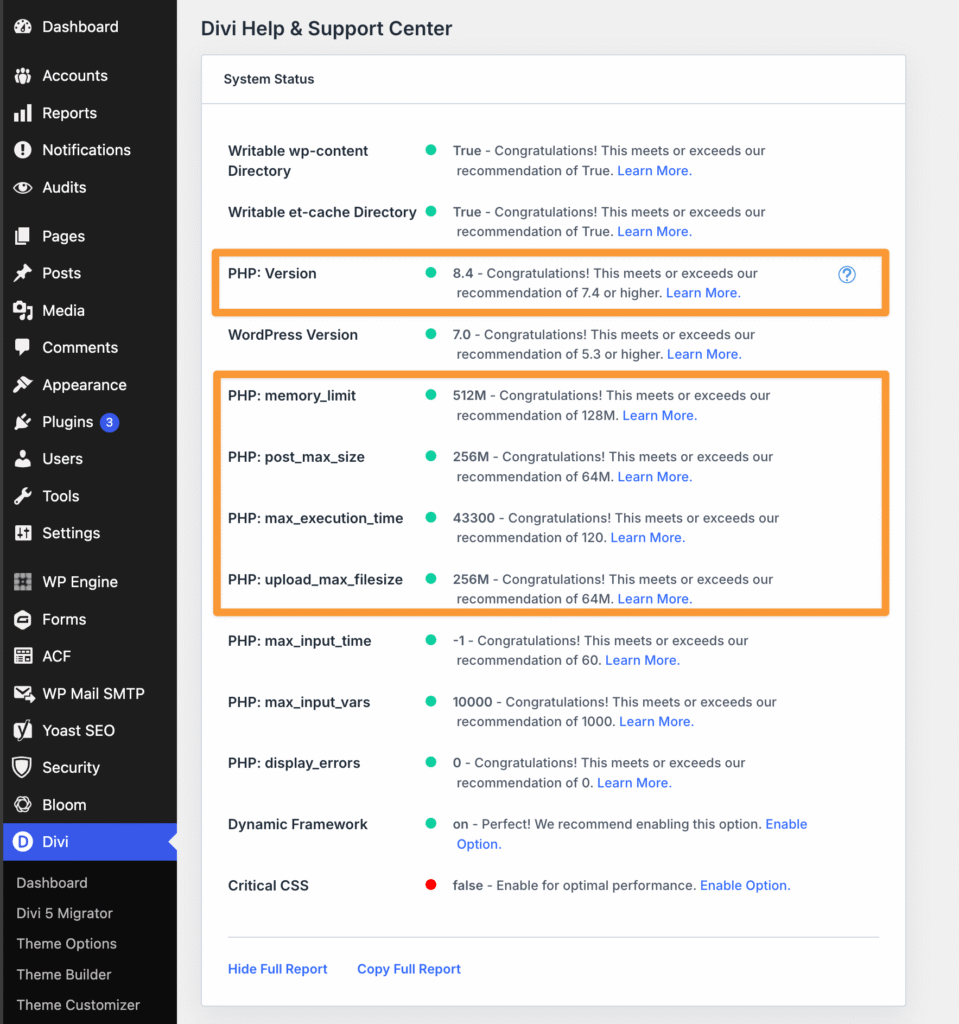
Where WPSimplifyd looks first. Divi flags each setting green or red against its own recommendations — red dots point straight at the environment, not the framework.
- Hosting & backups. Is there a one-click-to-deploy staging environment? Can the site be restored from a backup in one click? If not, that comes first — always work on a copy, back up before (and often after) troubleshooting.
- Maintenance history. Have WordPress, Divi, and plugins been updated regularly? A word of caution here: if a site has been neglected for a long time, updating everything at once can actually cause breakage rather than fix it — jumping many versions in one leap can surface conflicts that gradual updates would have caught early. This is exactly why the work belongs on a staging copy with a backup in hand, not on the live site. Outdated software does need to be brought current, but on a neglected site that’s a careful, tested process — not a one-click rush.
- Safe Mode. Divi’s Safe Mode disables most plugins to help isolate conflicts faster.
- Child theme check. If there’s a child theme, temporarily activating Divi itself can reveal whether the child theme is the culprit.
In the vast majority of cases, Divi itself isn’t the issue. It’s one of the things above — or something more involved that the Divi Rescue Assessment will surface.

What the $200 Assessment Actually Buys You
Let’s set expectations honestly, because this matters. The Divi Rescue Assessment is $200 for up to 2 hours, and it buys focused, expert investigation and a clear path forward — not a guaranteed same-day fix.
If your site has been neglected for years, $200 won’t undo years of neglect in 2 hours.
What those 2 hours will do is get a very experienced Divi specialist into your site to find what’s actually going on and tell you, in plain English, what’s been uncovered so far and what the realistic next steps are. Most of the time that’s enough to pinpoint the problem and scope the fix. Occasionally a site is tangled enough that two hours mainly reveals how tangled it is — in which case you’ll get an honest read on that too, and a recommendation for how to proceed.
What’s included:
- Up to 2 hours of focused investigation
- Divi-specific diagnostics — System Status, hosting, caching layers, child theme, Builder and plugin conflicts
- An honest assessment of whether the site can be responsibly rescued, stabilized, or whether a different path makes more sense
What you’ll receive:
- A plain-English summary of what the investigation found
- Recommended next steps, prioritized by what matters most
- Pricing ranges where the scope is clear enough to estimate
- A realistic timeline where one can reasonably be given
What you need to provide:
- The URL where the problem is happening — and a screenshot or short screen recording if you can, especially for visual issues or anything intermittent
- WordPress admin login
- Hosting / cPanel or FTP access
- A note on when the problem started and any recent changes
The more you can show, the better. A problem that’s visible in a screenshot or recording is one that doesn’t have to be reproduced from scratch — which means more of the two hours goes toward solving it.
A note on access and feasibility: This is a time-boxed, two-hour investigation, and that time starts when the work starts — not when access is finally sorted out. Setup matters more than people expect: if much of the window goes to getting FTP set up, adding a WordPress user, granting hosting-portal access, or working around a locked-down site, that time still counts toward the two hours. Whatever the investigation reaches in that window, you’ll get an honest account of where things stand and what’s recommended from there. The smoother the access, the more of the two hours goes to the actual diagnosis.
The goal isn’t to sell you a fix you don’t need. It’s to give you honest answers early — which is exactly what prevents bigger, more expensive problems later.
FAQs — What Clients Ask Before Getting Started
Not sure how the Divi Rescue process works? These answers cover the most common questions and set clear expectations before you begin.
What if the fix costs more than I expected?
Sometimes the assessment surfaces more than a single broken thing — especially on a site that’s been neglected for a while. When that happens, here’s what you can expect:
- A clear, itemized estimate before any rescue work begins (beyond the assessment)
- Recommendations prioritized by urgency — what needs attention now, what can wait, and what can be monitored
- Guidance on options if the scope exceeds your budget, including what can be safely deferred
The $200 assessment is yours regardless. You can use the findings to move forward with rescue work, plan next steps, or seek another opinion.
Takeaway: The goal isn’t surprise bills or pressure — it’s accurate information so your site can be fixed responsibly, not temporarily patched.
Why start with an assessment instead of just fixing it?
On a Divi site, a “broken form” or “slow page” is rarely just that. The visible issue often masks deeper factors:
- Hosting limitations affecting performance and stability
- Outdated PHP versions or low resource limits causing conflicts
- Plugin conflicts waiting to resurface at the next update
- Customizations made without a child theme
- Caching layers serving outdated or broken content
The assessment identifies what’s actually happening so you can make informed decisions about what to fix now, what to monitor, and what may need a broader approach.
Takeaway: Accurate diagnosis prevents wasted effort, repeat failures, and fixing the wrong thing first.
What if you can’t access my site during the assessment?
The assessment is time-based and assumes reasonable access to your WordPress site and hosting environment. If access issues — incorrect credentials, hosting limitations, or a severely broken site — prevent meaningful troubleshooting during the window, the time spent is still considered used. In those cases, you’ll receive a clear explanation of what blocked progress and what would be required to move forward.
Takeaway: The assessment covers expert time and investigation — not guaranteed access or outcomes.
Why does hosting affect Divi Rescue work?
Hosting plays a major role in how safely and efficiently troubleshooting can be done. Managed WordPress hosts with staging environments and reliable backups allow issues to be diagnosed and tested without risking the live site. On hosts without those tools, some setup may be required before meaningful troubleshooting can begin. Any additional work is discussed before proceeding.
Takeaway: The same problem can require very different effort depending on how a site is hosted.
Still Have Questions?
Every Divi site is different, and it’s normal to wonder how rescue applies to yours. WPSimplifyd gives clear, straightforward answers — no jargon, no pressure — so you can decide what makes sense for your site.
Built for Business Owners Who Can’t Afford Downtime
Your website isn’t just a digital brochure. It’s how people find you, evaluate your work, and decide whether they trust you enough to reach out.
When it breaks — forms stop working, pages won’t load, or the site behaves unpredictably — the impact goes beyond inconvenience. Opportunities are missed, credibility takes a hit, and problems often surface at the worst possible time.
WPS Divi Rescue is built for business owners who need their site to work reliably, not occasionally.
Divi Rescue Is a Good Fit If:
- Your website plays a direct role in generating leads or inquiries
- Your work depends on a professional online presence that reflects credibility
- You don’t have in-house technical support and need someone you can rely on
- You’re tired of reactive fixes and recurring emergencies
- You want clear answers instead of guesswork
This service is especially helpful for portfolio-driven and service-based businesses — designers, consultants, photographers, agencies, and small business owners whose reputation depends on a site that works when prospects visit.
A Quick Word on “Just Let AI Fix It”: It’s tempting to think AI can simply repair a broken site, or build you a new one from a prompt. The reality is less magical: AI is a powerful tool, but it still needs someone with the experience to guide it, check its work, and call its bluff when it’s confidently wrong. WPSimplifyd uses modern tools — including AI — but the judgment about what’s actually right for your site comes from 25+ years of professional graphic design, web design, and development — and specializing in Divi since 2015.
Not on Divi?
WPSimplifyd rescues WordPress sites built with any theme or page builder. If your site isn’t on Divi, you’re still in the right place — start with WordPress Site Repair & Website Rescue.
How WPSimplifyd Approaches Divi Rescue
WPSimplifyd has been designing and developing websites since 1995, and working exclusively in Divi since 2015 — long enough to have encountered, diagnosed, and resolved nearly every kind of Divi failure.
Rescue work isn’t about quick patches or guesswork. It’s about understanding how a site was built, what’s been neglected, and where the real risks are — then fixing problems in a way that doesn’t create new ones.
What Makes This Approach Different
- Problems are diagnosed systematically, not guessed at
- Fixes are chosen based on impact and risk, not convenience
- Underlying causes are addressed — not just visible symptoms
- Recommendations are based on what’s responsible, not what’s billable
If a problem can be fixed safely, it will be. If a fix would be temporary, risky, or misleading, that’s explained before any work begins.
The Goal of Divi Rescue
The goal isn’t to make a broken site limp along until the next failure. It’s to restore stability, explain what went wrong, and give you a clear understanding of what it takes to keep the site reliable going forward.
What WPSimplifyd Commits To
Divi Rescue works best when expectations are clear on both sides. These commitments are in place to protect your site, your budget, and your time — as well as to ensure rescue work is handled responsibly.
- Transparent pricing — You’ll know costs and scope before any rescue work begins
- No surprise work — Nothing proceeds without your approval
- Real fixes — Problems are addressed properly, not patched temporarily
- Honest recommendations — If something isn’t needed, it won’t be suggested
- Clear communication — Issues and options are explained in plain language
WPS Divi Rescue is not about locking you into services you don’t need. It’s about giving you accurate information, realistic options, and professional execution when work moves forward.
——— Award-Winning Design / Custom Development & Divi Expertise / Smart AI Tools / U.S.-Based. ———